D&D session scheduler
Schedule D&D sessions with one link: players vote on dates without an account, see times in their own time zone, and the decided date goes in their calendar.
Most D&D groups don’t stall over rules arguments. They stall because nobody can agree on a night. The DM asks in the group chat, three players answer, two answer a different question, someone in another time zone replies for the wrong 7 PM, and the thread scrolls away before anything is decided.
EventMoot is a scheduling poll built for that. You offer a few dates and times, send one link, and your players tap Yes, Maybe or No on each. You see which night works for the most people, pick it, and everyone gets the decided session with a button to add it to their calendar.
It works for a one-shot with friends of friends and for a campaign that has run for years. Players don’t need an account to answer, so the person who joined last week can vote as easily as your oldest player.
How to schedule a D&D session
Offer a few dates and times
Create an event and add a date poll. Pick the dates you could run the session and give each one a time slot, such as 7:00 to 10:00 PM, or leave the times off to ask about whole days. Set a response deadline if you need answers by a certain day. The same event can ask more than the date: which adventure to run next, who’s bringing snacks, or whether to play online or at the table.
Drop the link in your group chat
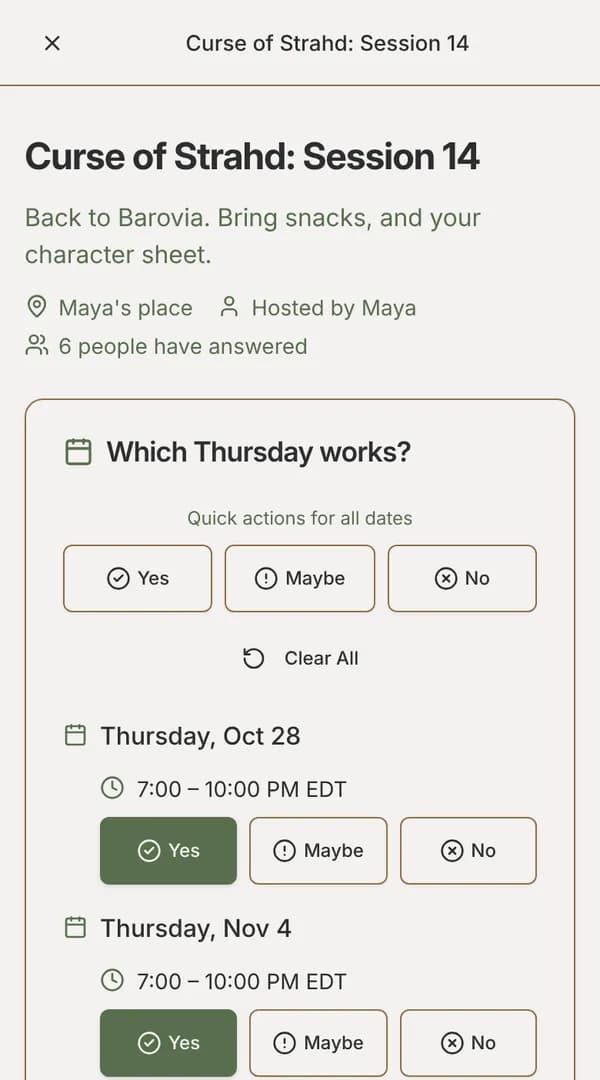
Publishing copies the event’s invite link. Paste it into Discord, WhatsApp, a text thread or wherever your party talks. Players open it, answer Yes, Maybe or No for each time, and submit. Each player sees the times in their own time zone, so the DM in New York and the player in Los Angeles are talking about the same session.
See which night works
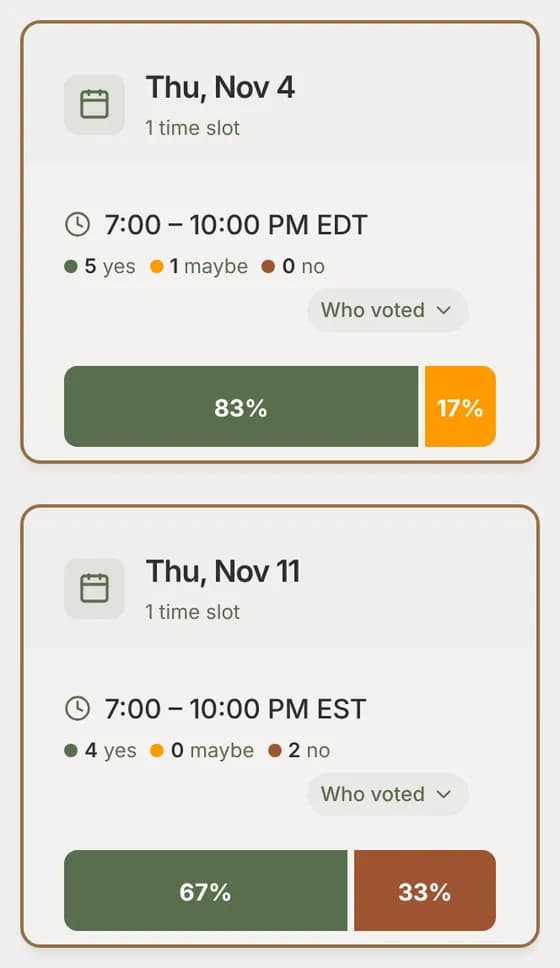
Answers show up as they come in, and the results list the dates with the most Yes answers first, with each date’s Maybes and Nos. When one date is a clear winner, it’s already selected when you go to finalize.
Lock in the session
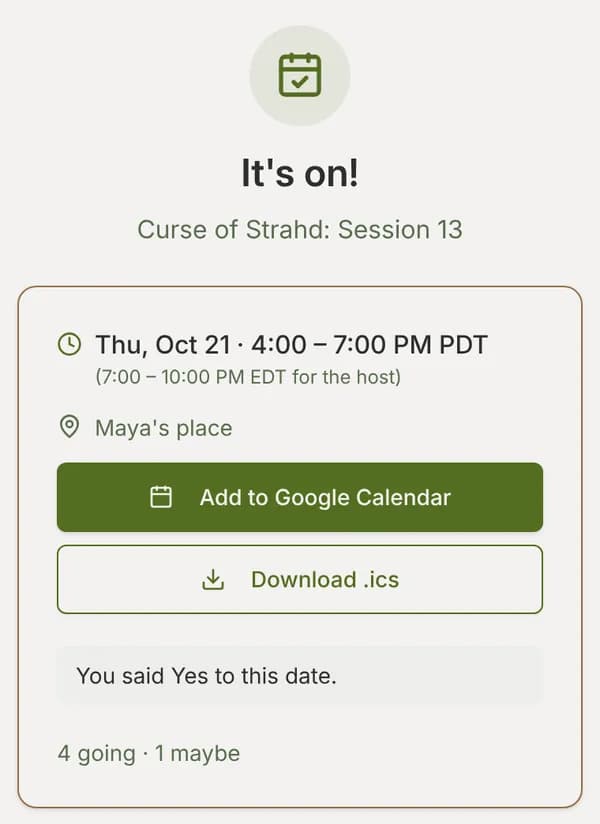
Pick the date and time, and tell everyone. Players with an account get a notice and an email with the date in their own time zone, worded for how they voted. The invite link now shows the decided session with Add to Google Calendar and Download .ics buttons, and how many are going.
For a campaign, make your table a moot
A moot is EventMoot’s name for a group that keeps meeting. Invite your players once, and every session you plan in the moot reaches all of them. Each moot has a message board for recaps, character art and rules questions, a document library for maps and handouts, and an Availability tab where players save the hours they can usually play. The moot’s heat map then shows when most of the table is free, before you send a poll.
When a session is decided, Run again next week makes a draft of the next one: the same time a week later, or the same date poll moved on a week. Nothing is sent until you publish it.
Same night every week Ent plan
If your table plays the same night every week, a recurring pattern posts each session for you, and players just answer Going, Maybe or Can’t go. If the night moves around, it opens a date poll for each session instead. You can skip a week or move one session without touching the rest. Recurring sessions are part of the Ent plan ($5/mo or $50/yr). See recurring game night for how both kinds work.
Answers that fill themselves in
Players who sign up can save their usual week. On a new poll, Fill dates answers the dates they haven’t answered yet from that availability, and answers No to any date that clashes with another EventMoot event they’re going to. It never changes an answer they already gave, and they check it before submitting. That works on every plan. On Ent, they can also connect Google Calendar, Apple iCloud, Nextcloud or another CalDAV calendar so its busy times count too.
What it costs
Entling, the free plan, covers everything above that isn't marked Ent, with limits on events, polls and people per event. Ent is $5/mo or $50/yr, raises those limits and adds the features marked Ent. The pricing page lists each plan's current limits.
Questions
Do my players need an account?
No. Anyone with the invite link can answer by giving their name. A guest’s answers are kept in their browser, and guests don’t get email updates: they open the link again to see the decided date. Players who sign up get notices, can finish their answers on another device, and can use Fill dates.
What about players in other time zones?
Every time is shown in the reader’s own time zone, on the poll and on the decided session. The decided page also shows the host’s time, so nobody has to do the conversion.
Is EventMoot free for a D&D group?
Yes. Entling, the free plan, has date polls, the other poll types, moots and message boards, with limits on events, polls and players per event. Ent is $5/mo or $50/yr and adds recurring sessions, Discord webhooks and calendar sync, with higher limits.
Can I ask more than the date?
Yes. One event can hold several polls: date and time, single choice, multiple choice, yes/no, ranking, rating and text answers. Use them for the next adventure, food, or session zero questions, and your players answer them all on one page.
See it before you sign up
The sample poll is the same poll your group would answer. No account needed, and nothing is saved.