Group availability poll
Find a time that suits a whole group: send one link, everyone marks Yes, Maybe or No on each date in their own time zone, and the best time comes out on top.
Finding a time that suits a whole group is a small job that takes far too long. You ask when everyone’s free, people answer in different formats, some reply to an old message, and one person says “any evening but Tuesday” in a time zone you have to look up. Then you put it all in a spreadsheet and hope you read it right.
A group availability poll does the sorting for you. You offer the dates and times that could work, send one link, and each person marks Yes, Maybe or No on every option. The results count it up, so the best time is at the top instead of buried in a thread.
EventMoot was built for tabletop and game groups, but the poll works for any group that has to agree on a time: a club, a band rehearsal, a reunion or a volunteer rota.
How to run a group availability poll
Offer the options
Create an event and add a date poll. Pick the dates on the calendar and add time slots to each, or leave the times off to ask about whole days. Set a response deadline if you need an answer by a certain day.
Send one link
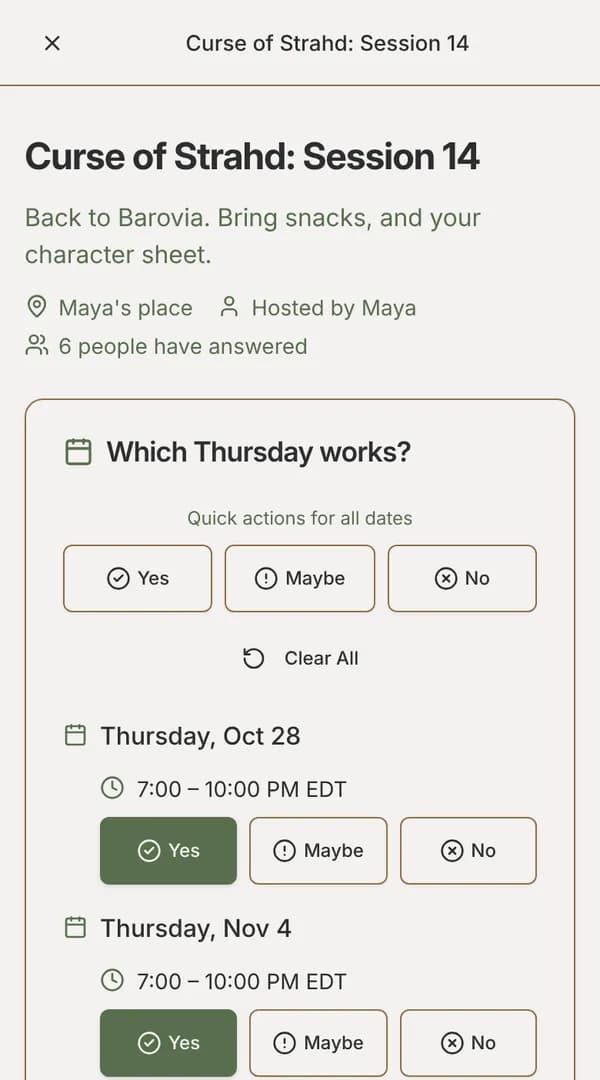
Publishing copies the invite link. Share it by message, email or chat. People open it, answer Yes, Maybe or No for each option and submit, with no account needed. Every time is shown in the reader’s own time zone, so nobody has to convert anything.
Read the results
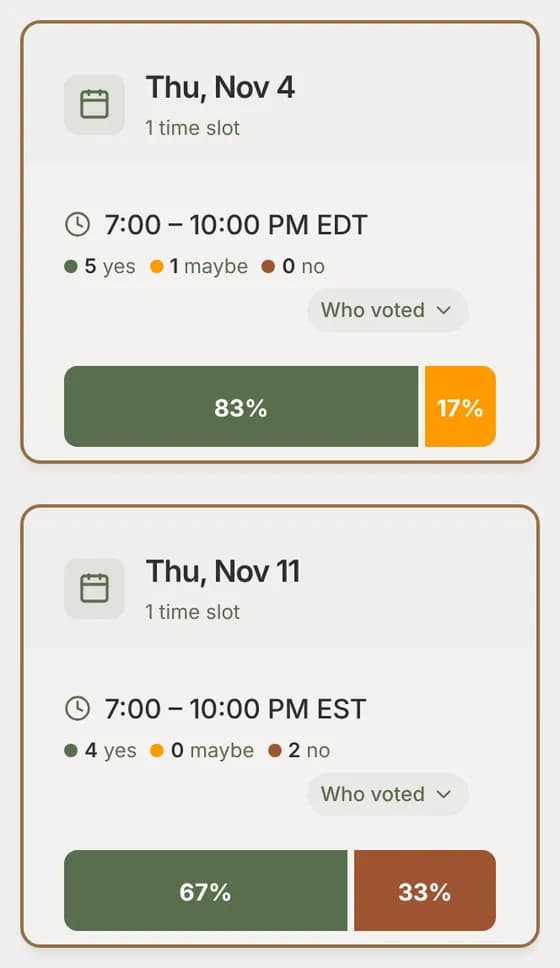
Answers appear as they come in. The results list the options with the most Yes answers first, each with its count of Yes, Maybe and No and the share who said yes. People can change their answers until voting closes.
Pick the time and tell everyone
When you finalize, the leading option is already selected, and you can pick another. If someone who said Yes now has another decided EventMoot event at that time, you’re told. Then notify everyone: the invite link shows the decided time in each person’s time zone, with buttons to add it to Google Calendar or download an .ics file.
For a group that meets often
If you poll the same people again and again, make them a moot. Members save the hours they’re usually free on the moot’s Availability tab, or custom hours just for that group. The moot’s heat map then shows, day by day, how many members can meet for a session of the length you choose, built from their saved hours and days away rather than poll answers.
Saved availability also speeds up the polls themselves. Fill dates answers the dates a member hasn’t answered yet from their usual week, answers No to dates that clash with other EventMoot events they’re going to, and never changes an answer they already gave. That works on every plan.
Connected calendars Ent plan
On Ent ($5/mo or $50/yr), members can connect Google Calendar, Apple iCloud, Nextcloud or another CalDAV calendar. Its busy times count when they fill in dates, and decided sessions they’re going to are added to it automatically. See setting up your availability.
What it costs
Entling, the free plan, covers everything above that isn't marked Ent, with limits on events, polls and people per event. Ent is $5/mo or $50/yr, raises those limits and adds the features marked Ent. The pricing page lists each plan's current limits.
Questions
Does everyone need an account to answer?
No. Anyone with the link can answer by giving their name. Guests’ answers are kept in their browser, and they open the link again to see the decided time. People with an account also get notices and can finish answering on another device.
Can I ask about whole days instead of times?
Yes. Leave the time slots off and people answer per day. The event is then decided as an all-day date, the same date for everyone wherever they are.
How does it handle different time zones?
Each person sees every time in their own time zone, on the poll and on the decided page, so a group spread across countries reads the same options correctly.
Is it free?
Yes. Entling, the free plan, includes date polls, with limits on events, polls and people per event. Ent is $5/mo or $50/yr, raises those limits and adds calendar connections, recurring sessions and Discord webhooks.
See it before you sign up
The sample poll is the same poll your group would answer. No account needed, and nothing is saved.